
CU
Cursor
Give Cursor access to audits, opportunities, keyword intelligence, and project packs while it works in your repository.
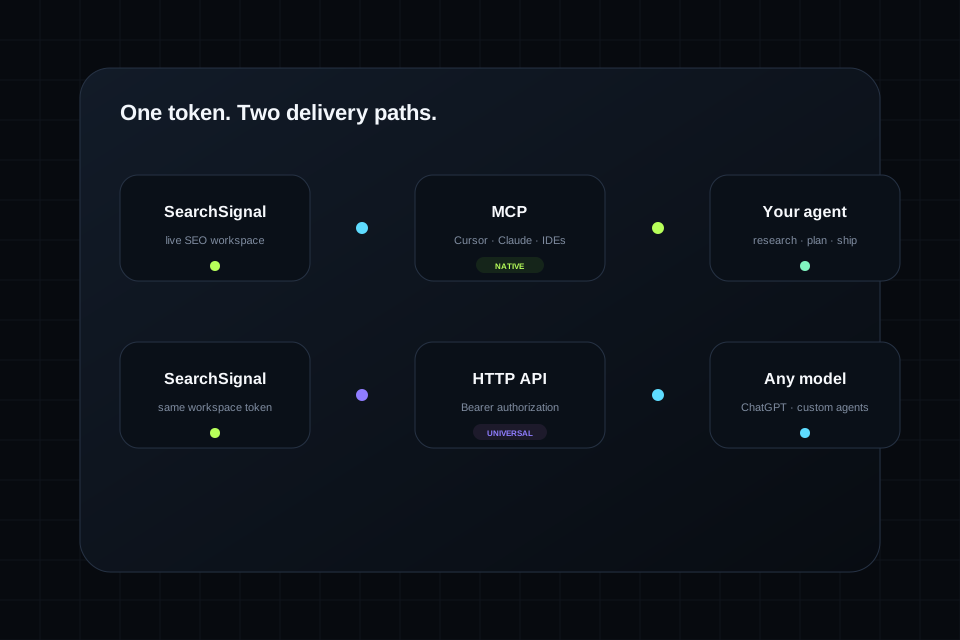
MCPOne SearchSignal token supports MCP clients and authenticated HTTP agents. Choose the setup for your tool, paste the generated config, and keep working in the environment you know.
Give Cursor access to audits, opportunities, keyword intelligence, and project packs while it works in your repository.
MCPUse SearchSignal as live context in Claude conversations and coding workflows without rebuilding the SEO brief.
MCPUse the Bearer HTTP API in your own actions, connectors, or agent workflows when MCP is not the chosen path.
HTTP APIKeep SEO research available while the agent inspects, plans, and edits the project inside Windsurf.
MCPAttach SearchSignal to compatible MCP tooling around VS Code so search evidence stays close to the code.
MCPUse Bearer authorization and the SearchSignal API base when you are building your own agent, automation, or backend workflow.
HTTP APISearchSignal separates the workspace from the client. The token authenticates the user; the delivery path adapts to the model or environment.
The fastest way to understand the product is to use the agent to retrieve a real project briefing and turn it into a concrete plan.
“Pull my latest audit. Rank open issues by expected impact divided by effort.”
“Explore ‘SEO MCP server’ and return intent, opportunity score, winning page type, and a content angle.”
“Give me a workspace pack, inspect this repository, and create a file-by-file implementation plan.”
Choose your client, generate the exact config after sign-in, and let the agent retrieve its first live SearchSignal briefing.